Money State brief
The first screen is a dated state: what changed, whether one decision is waiting, what can stay quiet, and which receipts support the read.
Product demo
Walk the same build customers install, loaded with fictional demo households. You will see capture, source receipts, the dated Money State, and deeper planning before you decide. No sign-up is required, and the purchase carries a 30-day money-back refund if the real app is not for you.
Explore mode uses fictional data · no license key, account, or email · Windows 10/11 · macOS · Linux · your financial file stays local by default
Act 1 · Capture
Four ways in, all on your terms: type a balance, drop in a bank CSV or PDF statement, bring exports from Monarch, Simplifi, or Quicken, or let the browser extension catch exports while you bank. Files you drop in preview exactly what will change before anything saves; extension captures land deduplicated on a Captured page where you review what arrived.
You export at your bank like always; the extension hands the file to the local app.
Fictional Northwind Bank data. Your bank login stays with your bank; GlidePath imports the file you choose to send.
Imported transactions pick up categories from your old app’s export, and GlidePath learns your payees from there; the charts answer “where did it actually go?”
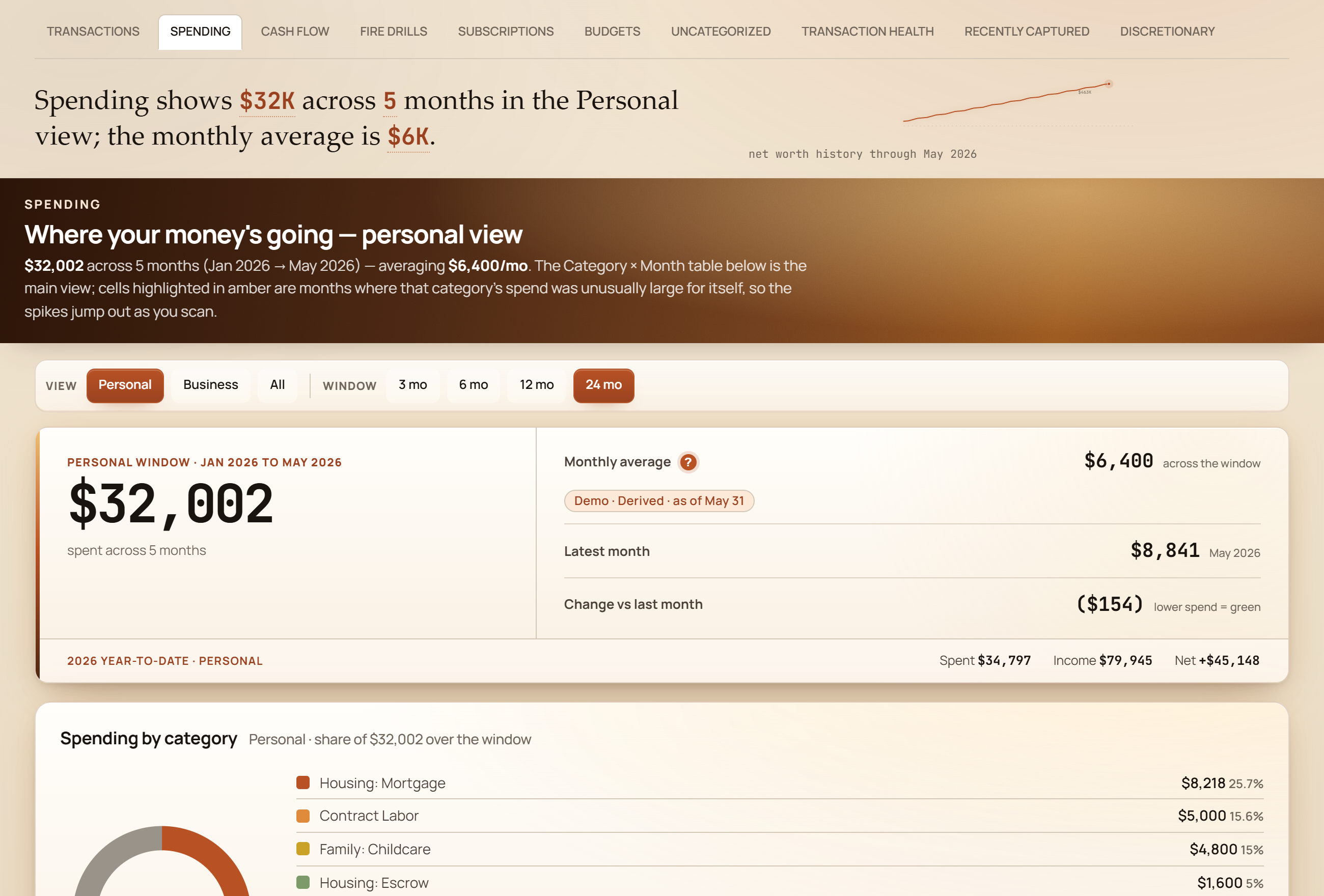
Fictional demo data.
Act 2 · Trust
Before you act on a picture, you get to check it. Major numbers carry a provenance chip — manual, imported, derived, or modeled, and how old the reading is — and the projections wear a confidence label with the assumptions one click away.
A plain-English verdict with its receipt of assumptions, and the quick-read cards beside it — the Outlook across 1,000 simulated futures (a Monte Carlo — many random market paths, counted up), the hardest-10% check, and the spending-reference comparison.
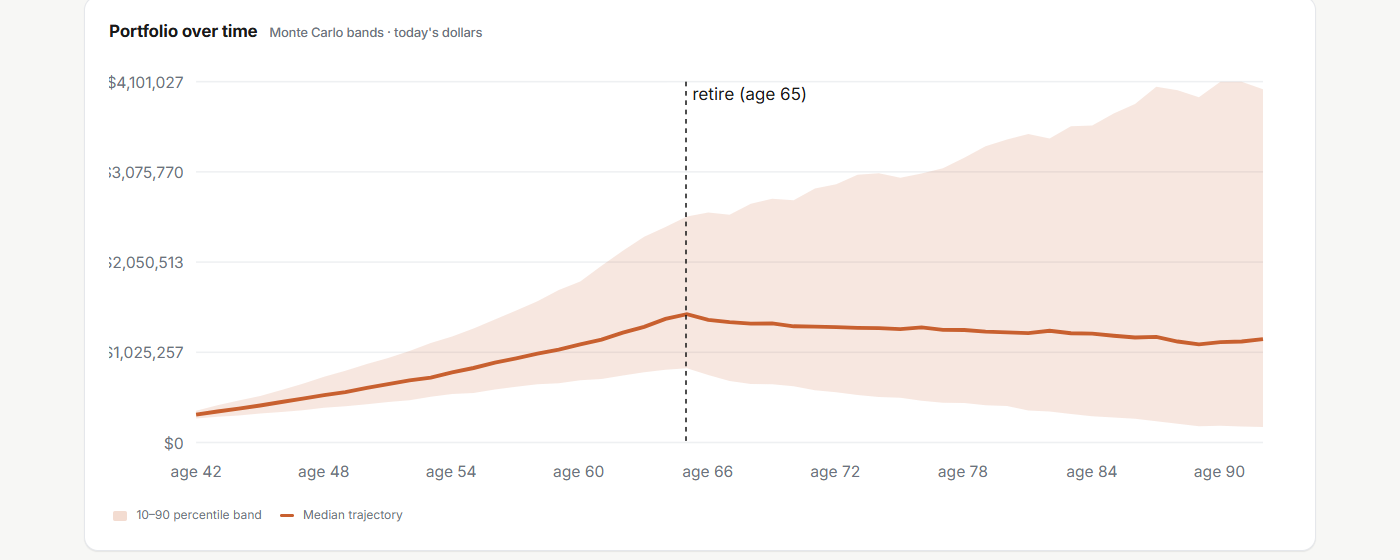
Fictional demo data. Projections are information, not advice.
The same proof pattern runs through the whole app: Money State, the balance-transfer cockpit, the tax views — each one shows its sources and its math rather than asking to be believed.
Act 3 · Money State
Money State says what the local files support, what changed, whether one decision is waiting, what can stay quiet, and how the current path echoes forward.
Period, freshness, status, boundary, modeled echo, one decision, and receipts — computed from local files.
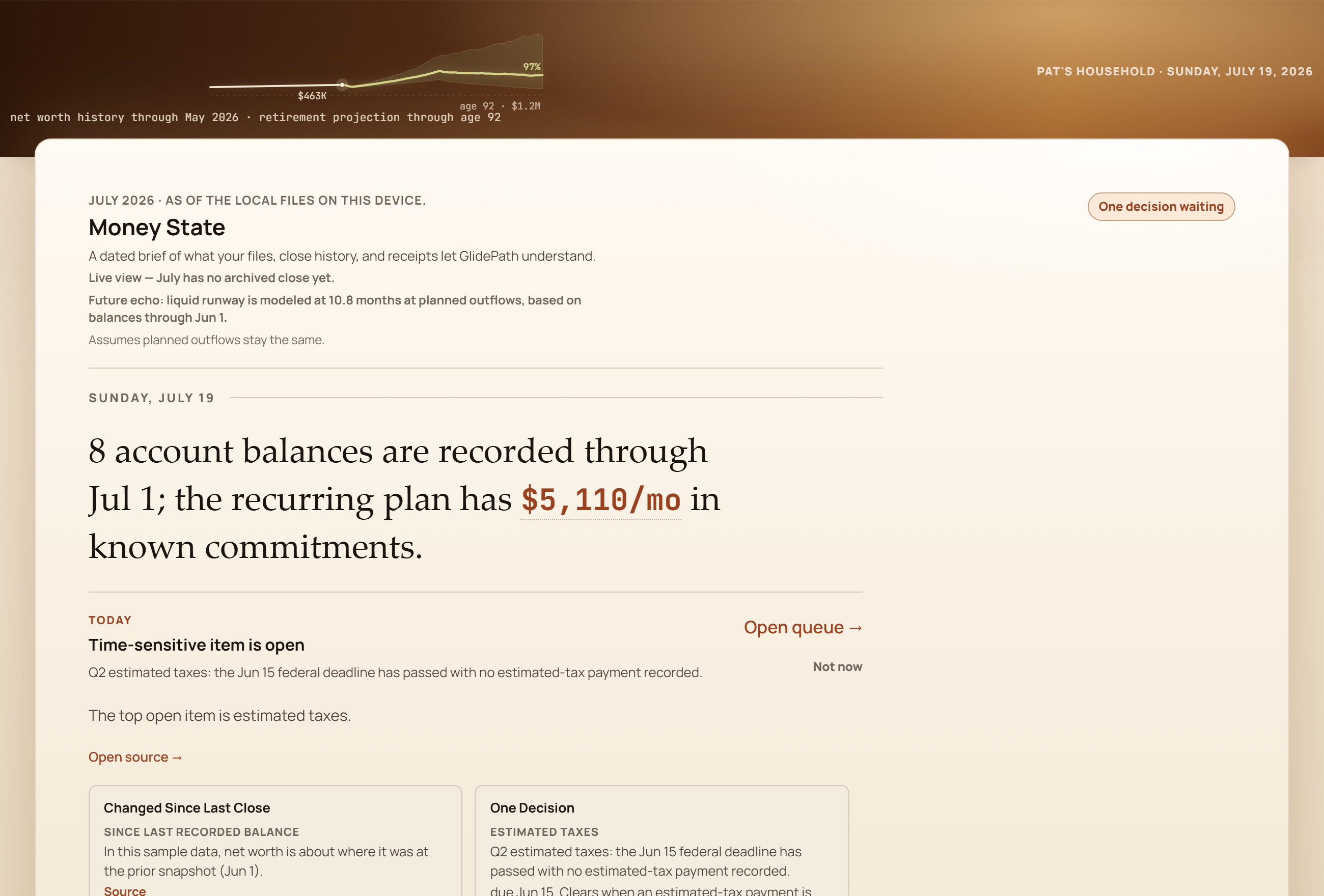
Fictional demo household. The demo label stays visible in the app until you exit and replace it with your own files.
Every account on one line you can actually explain — what's in it, when it moved, and why.
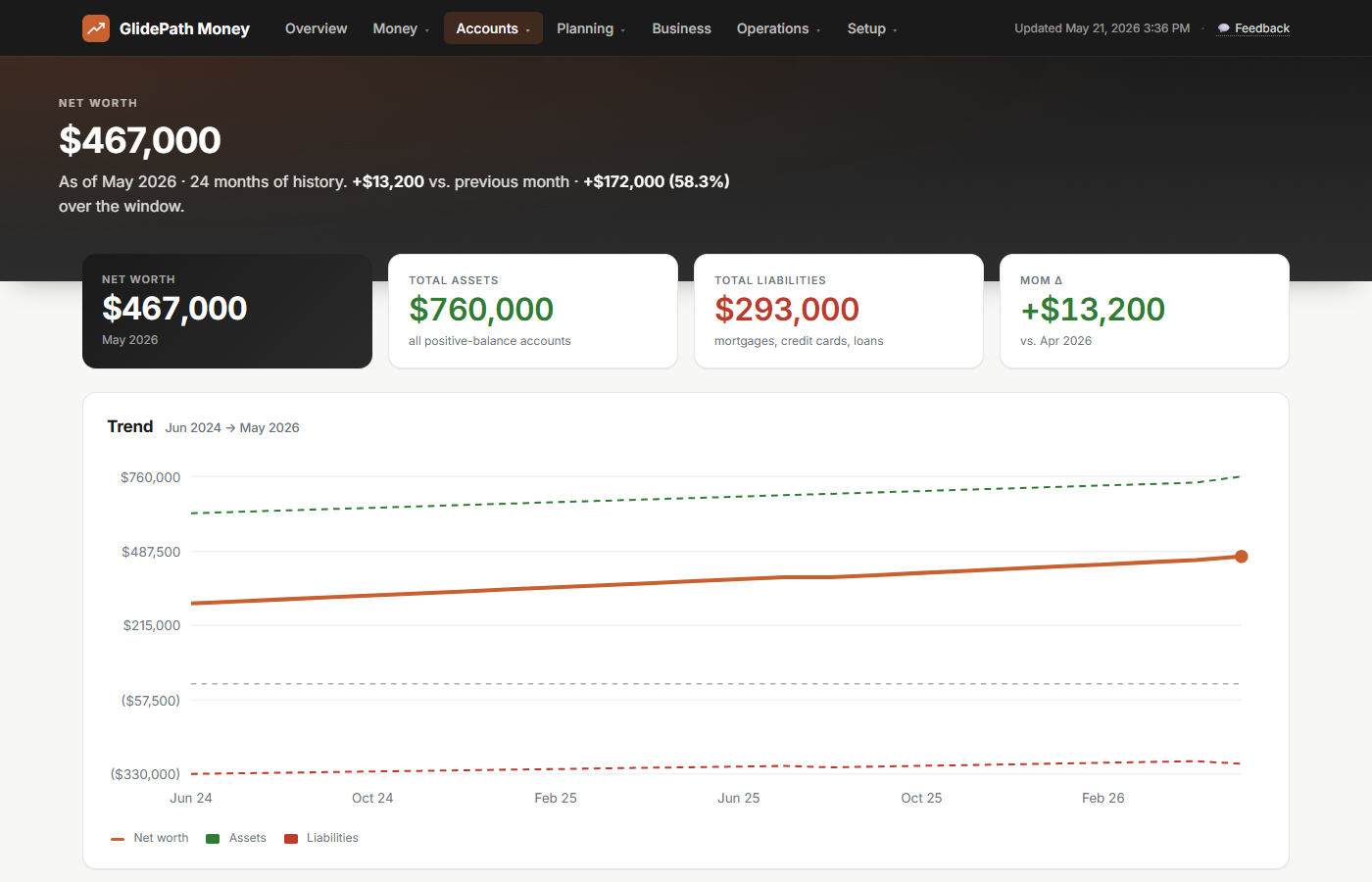
Fictional demo data.
Budgets are month-native — pick the month, see the actuals beside the targets, and choose which remainders carry forward. Saving writes a month plan; your imported rows stay untouched.
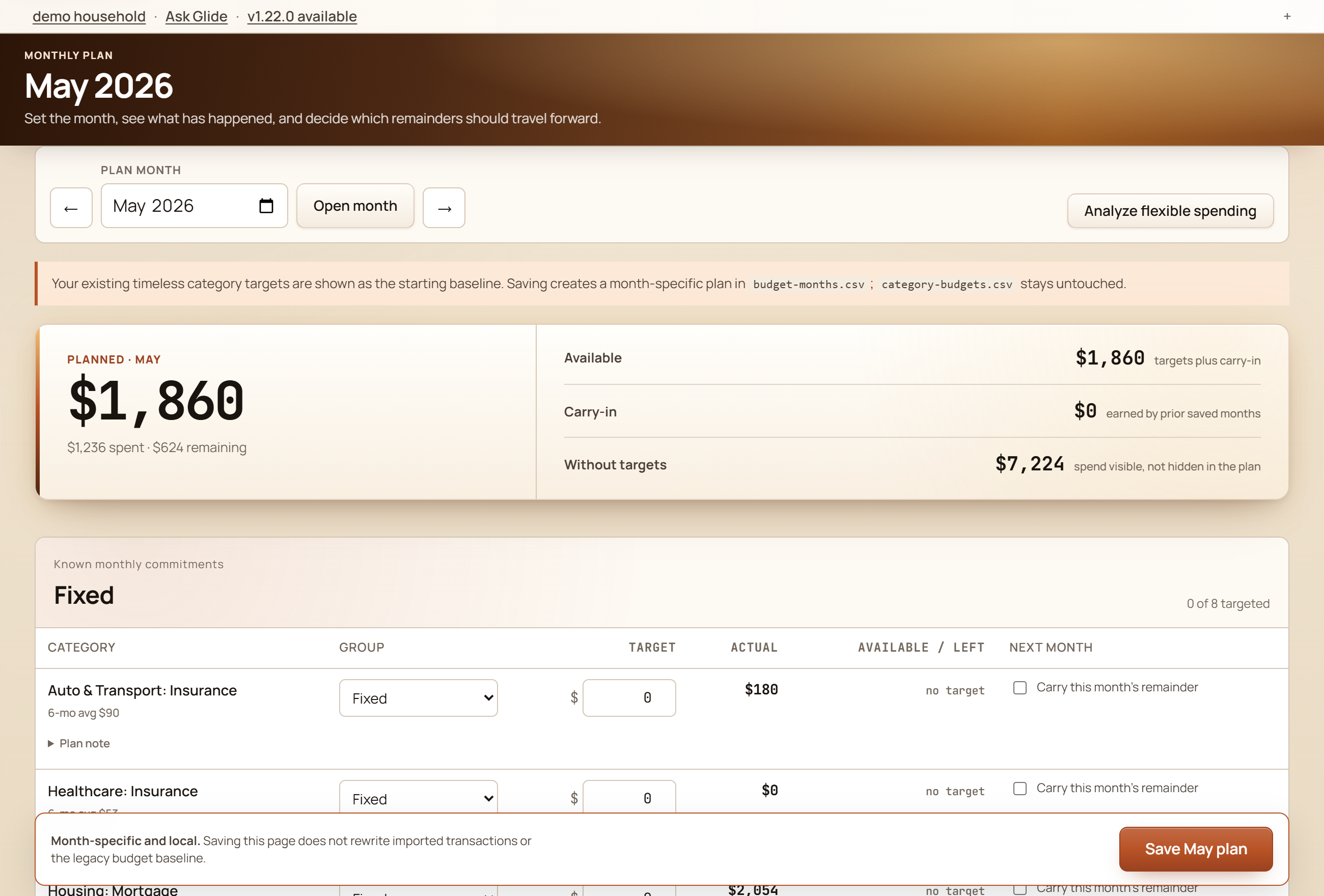
Fictional demo data.
Act 4 · The depth
These aren't daily chores — they're the deeper rooms you enter when one quick action connects to a bigger question. Signals help you start in the right place; rooms keep the depth organized; Ask Glide explains what you are looking at before you commit to a change.
Signals, rooms, and Ask Glide
The useful version of a broad finance app is not a bigger menu. It is a system that notices the next relevant thing, places it in the room where it belongs, and tells you what would clear it.
The first screen is a dated state: what changed, whether one decision is waiting, what can stay quiet, and which receipts support the read.
Imports are not just a file drop. The app can show expected files this cycle, what is fresh, what is still due, and which login stops cover them.
A saved plan and a modeled alternate sit side by side so success delta, future value, and bridge cost move together instead of hiding on separate pages.
Household basics, handoff details, insurance inventory, and tax documents get their own room so life-admin facts do not hide inside a budget screen.
Ask what a signal means and GlidePath can answer in plain English from the screen, local facts, and assumptions already in the app.
Promo deadline, the post-promo interest rate (APR), monthly-to-clear pace, and whether payoff is keeping up with the clock.
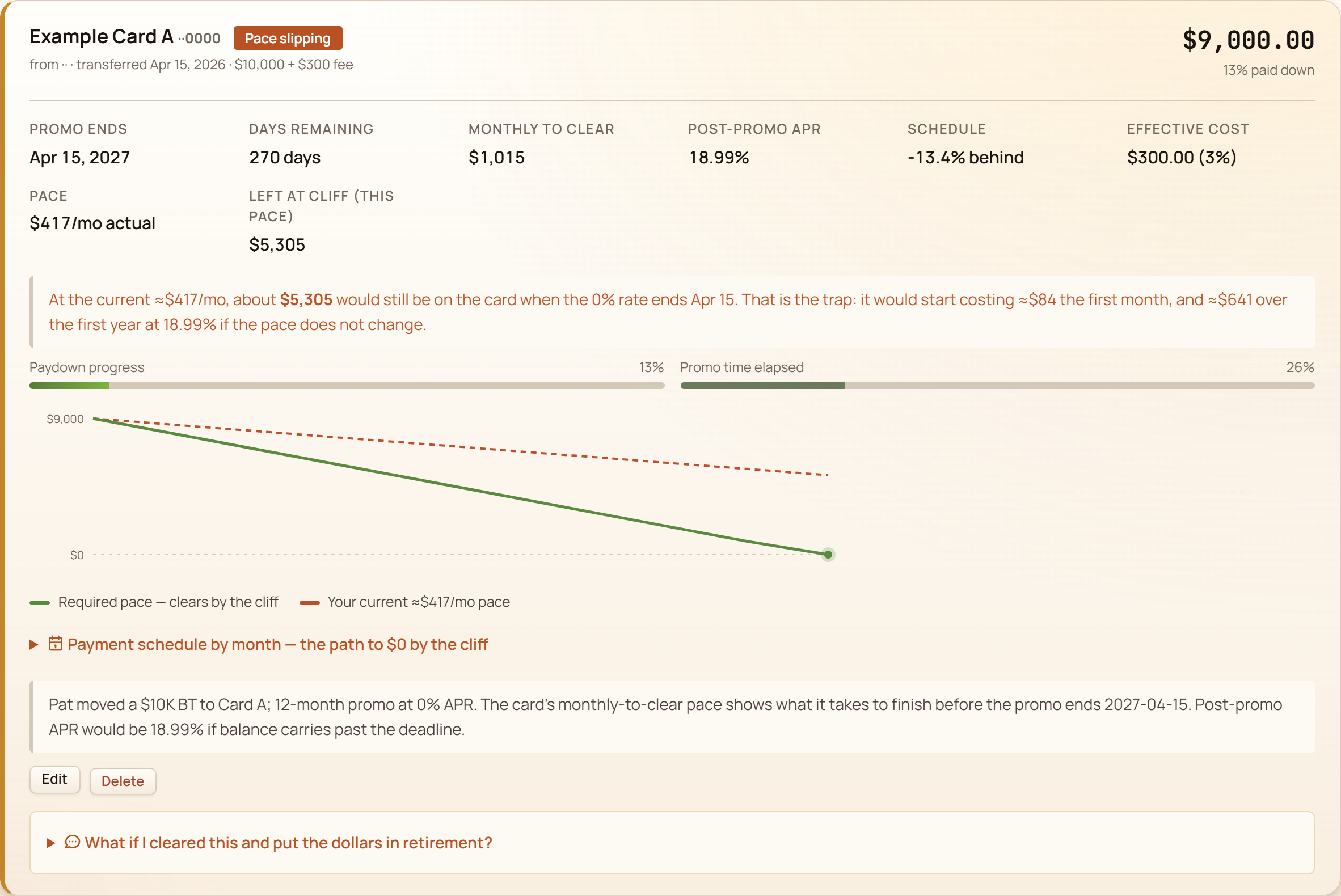
Fictional demo data. The full walkthrough lives on the balance-transfers page.
The signature move: Decision Studio ripple
Decision Studio starts with a saved plan and compares it to modeled alternatives: what happens to success probability, future balance, taxes, and the pre-65 health-coverage bridge if one lever moves? The balance-transfer cockpit shows the same discipline on a specific debt decision: if this card were cleared and the same dollars went to retirement instead, what actually changes? For the demo household's $9,000 transfer, the cascade reads: about $1,980 of tax saved this year (pre-tax 401(k) dollars at an assumed 22% bracket — dial it to yours), roughly $42,665 of future value by retirement at their 7% return assumption — and an honest +0 points on their Monte Carlo success, because at 97% there's almost no room left to improve. It would be easy to hide that last number. Showing it is the point: the math tells you when something doesn't move the needle, too.
Tax effect, future value, and the success-probability delta — with a confidence label and the assumptions one click away.
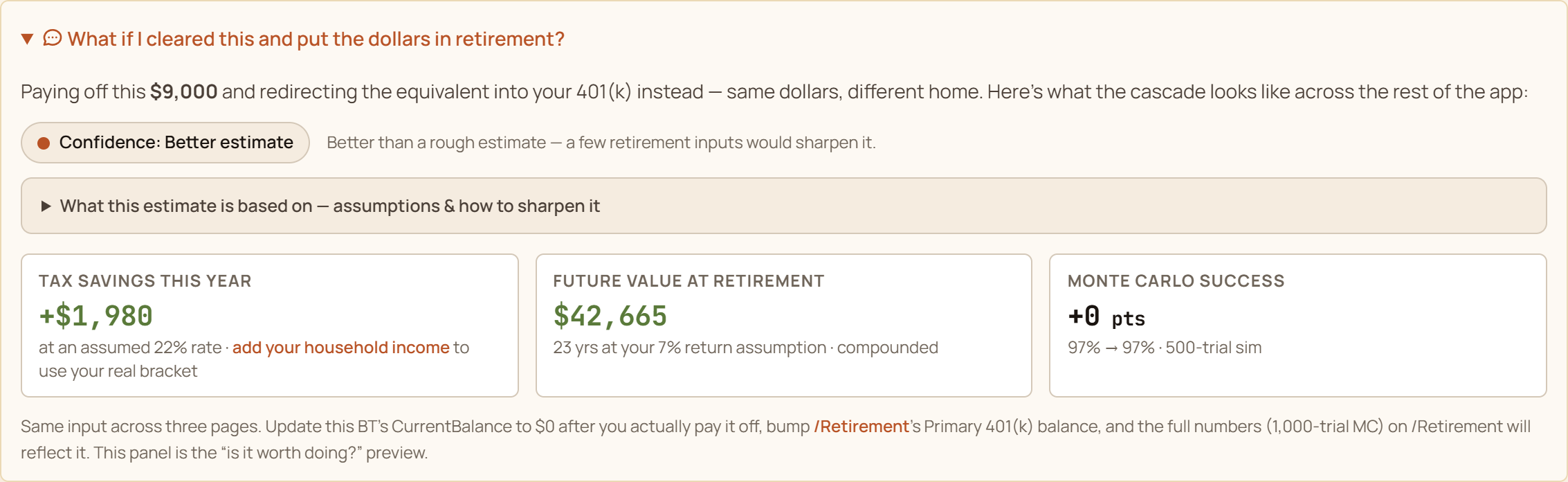
Fictional demo data. A what-if, not a recommendation — the decision stays yours.
The deeper planning pages are not disconnected calculators. HSA contribution room, backdoor-Roth pro-rata, tax-loss harvesting, coverage gaps, self-employment tax, QBI, and solo 401(k)/SEP estimates read from the same household file and keep the assumption trail visible for review.
Tax-year limit, age-55 catch-up, remaining room, and tax-value illustration.
Taxable lots, wash-sale flags, and conservative exclusions when evidence is incomplete.
Life and disability needs estimates beside policy inventory breadcrumbs.
Backdoor Roth, SE tax, QBI, and solo-plan receipts stay labeled as estimates.
Avalanche, snowball, and promo-aware — the simulator marches month-by-month, applies each card’s real APR (including 0% promos and post-promo cliffs), and shows the dollar difference.
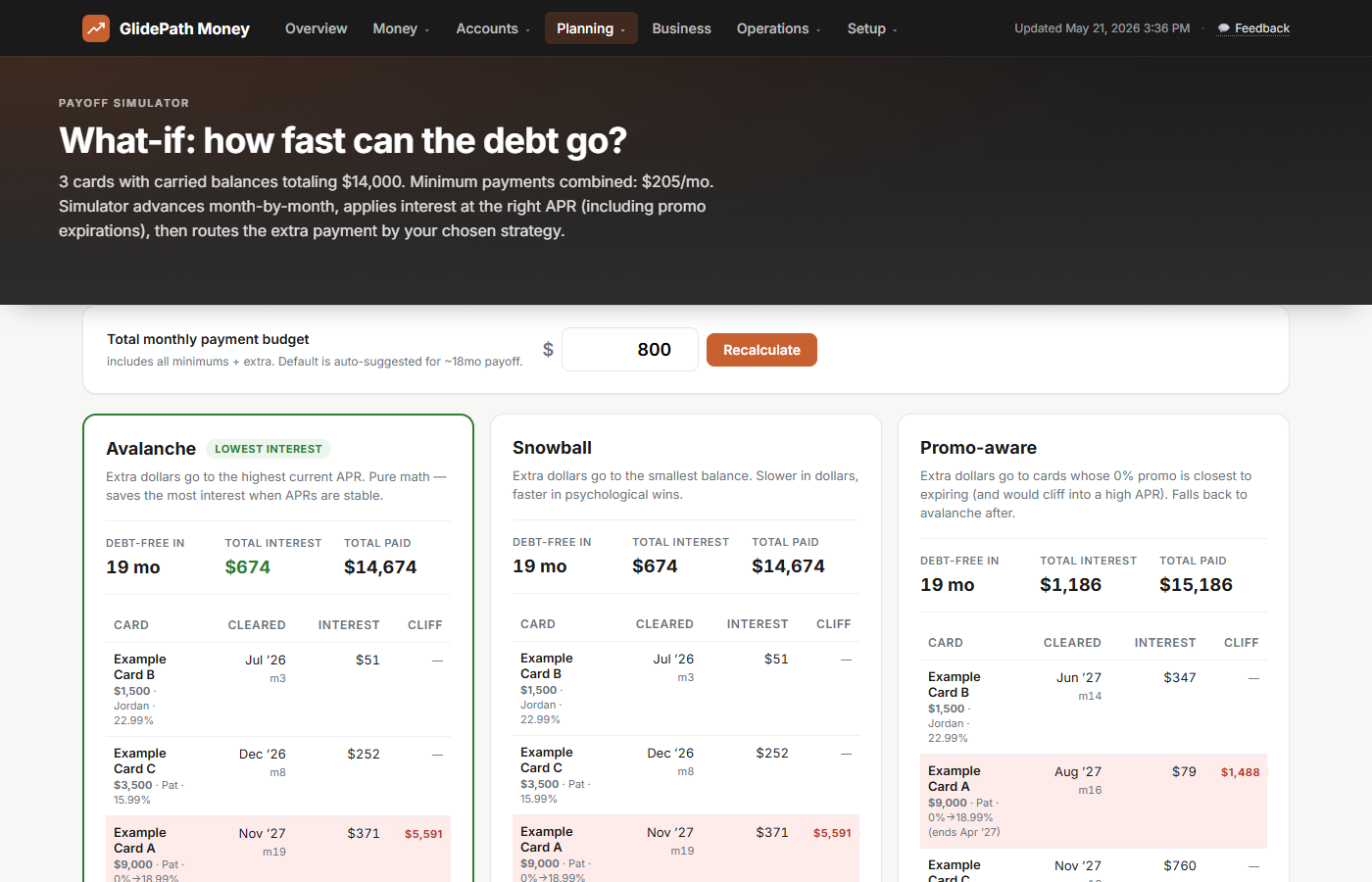
Fictional demo data. It runs all three so you can compare; the decision stays yours.
Positions and asset allocation across accounts. For price refresh, only the ticker symbols leave your machine.
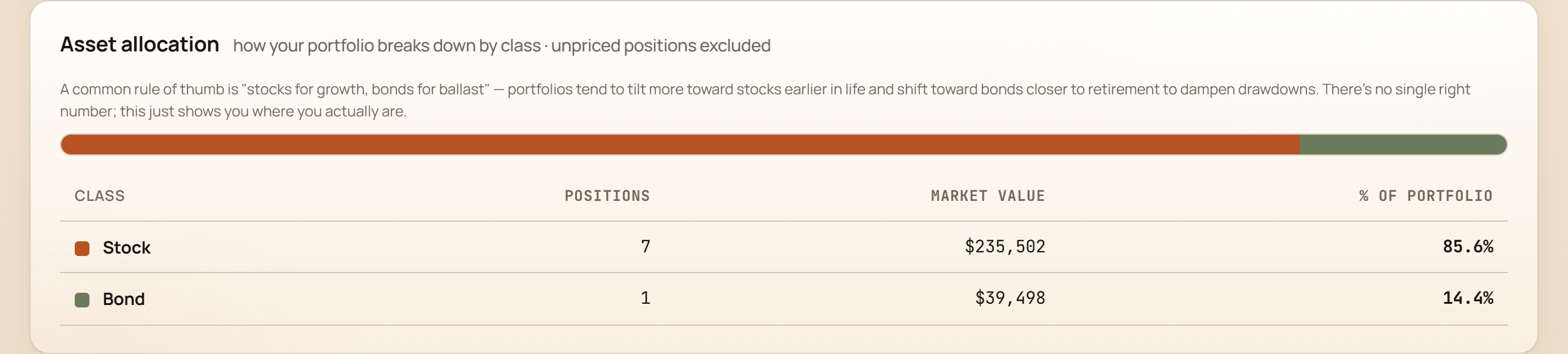
Fictional demo data.
The Personal+Business tier adds the self-employment toolkit — invoices, Schedule C, depreciation, mileage, self-employment tax, QBI, solo-plan estimates, and a year-end pack for your accountant.
Business transactions mapped to the IRS lines, all year long — not in a panic the first week of April.
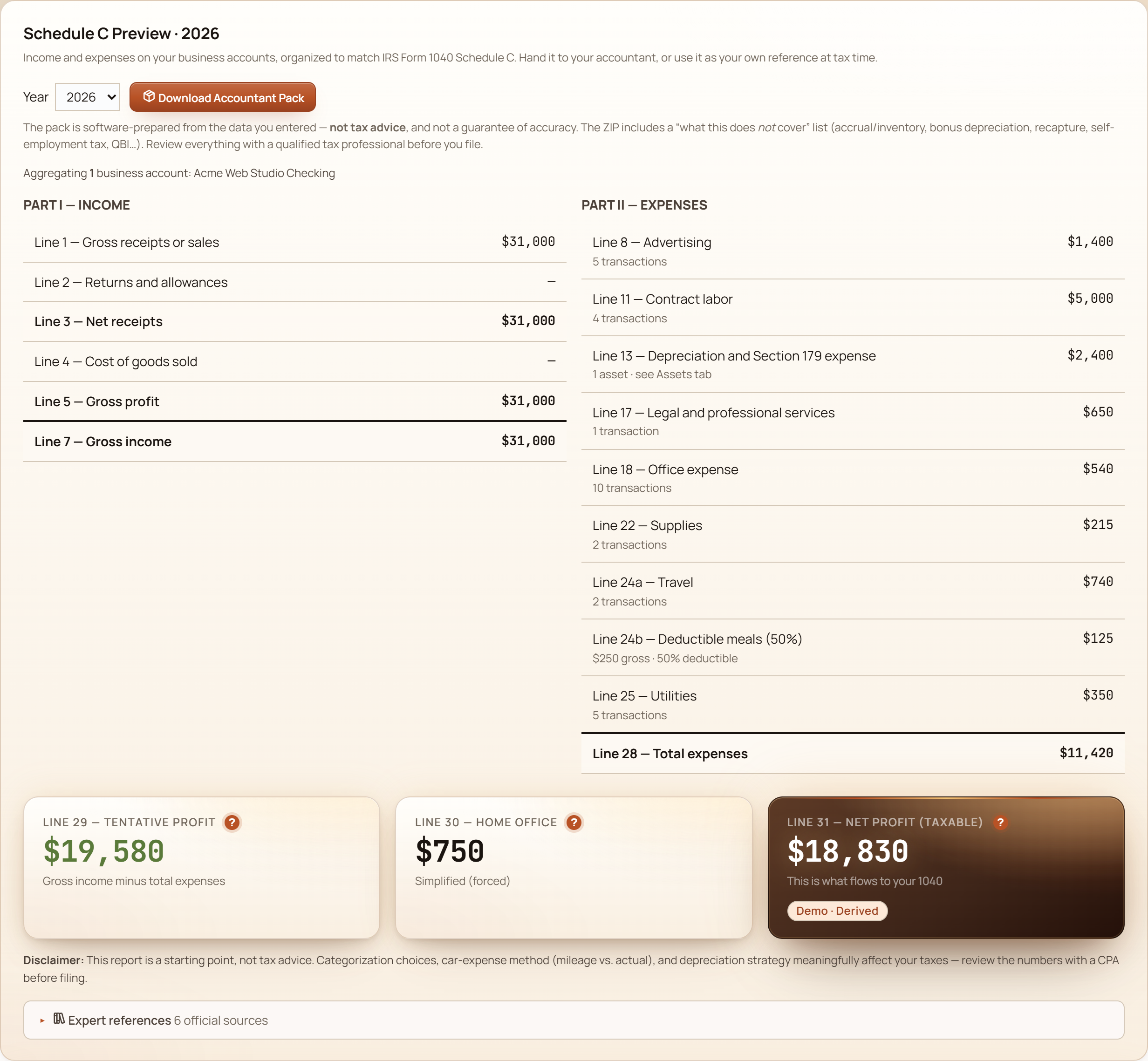
Fictional demo data. Estimates for planning, not for filing.
Branded PDF invoices in about a minute — then record each paid one straight to Schedule C income.
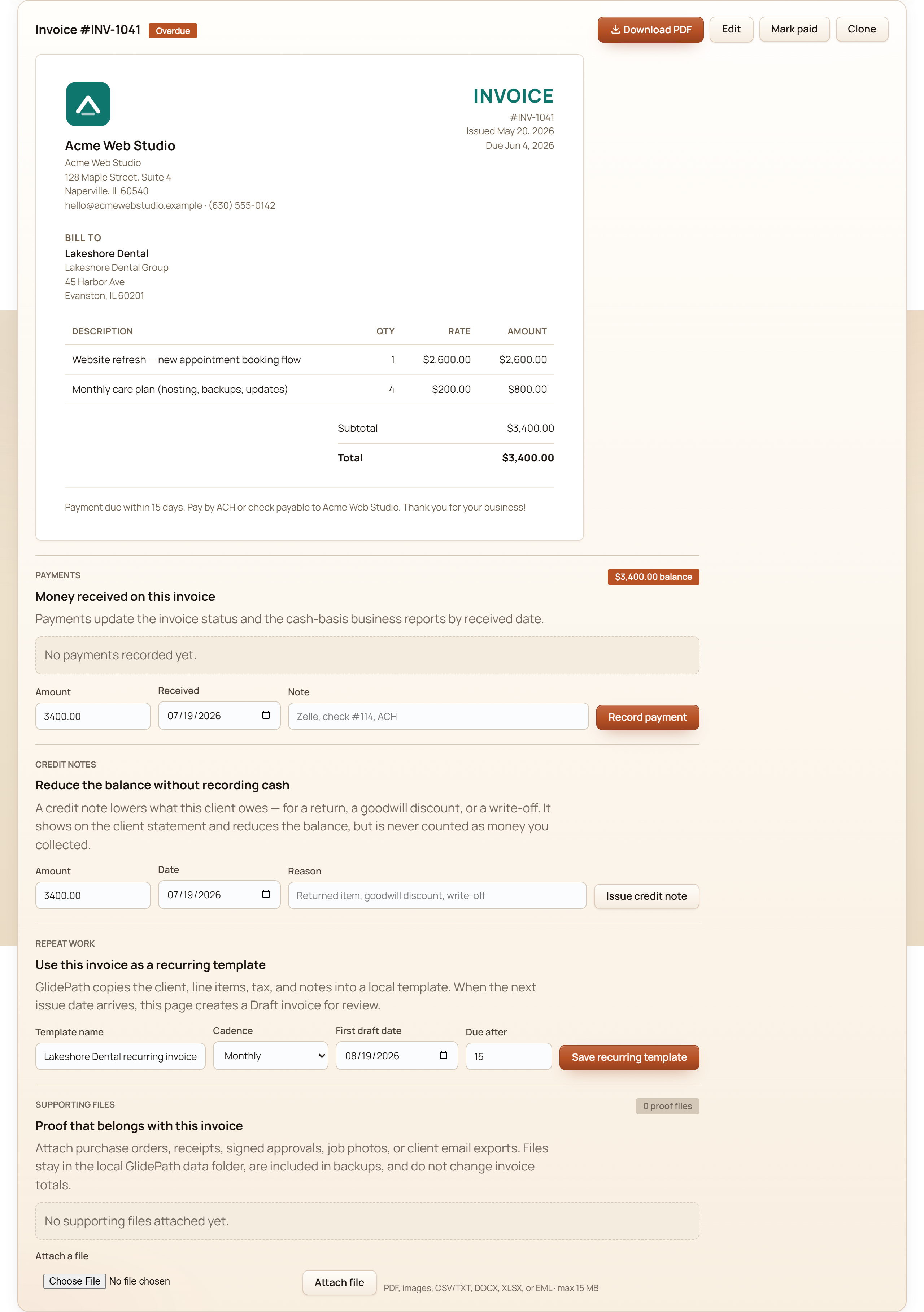
Fictional demo data.
Guided proof
Everything above used one fictional family — but the app ships four demo households, each built around a different money moment. After you install, load any of them from the Setup page with one click, walk the same screens, then replace it with your own data when you're ready.
Single, 28. Student loan, a 0% balance-transfer countdown, a first 401(k), and a house-down-payment goal.
“I finally make decent money — why does it keep evaporating?”
Her balance transfer has a visible deadline and a pace read — is the payoff keeping up with the promo clock? Her goals page turns “save for a house someday” into a bar that moves when her balances do, and the retirement page runs a real projection for a 28-year-old instead of telling her to come back in 20 years.
Dual-income couple, early 60s. Taxable brokerage, vested RSUs (company shares already theirs), a paid-off home.
“We saved well. When can we actually stop — and what about all this company stock?”
Their Tax Valley view finds the low-tax years between retiring and required withdrawals — the window where a Roth conversion (moving pre-tax retirement money to after-tax at today's rates) is cheapest to model. The ACA bridge panel prices health coverage before Medicare, and the equity pages put a number on how concentrated they are in one ticker.
Single retiree, 76. Social Security, a survivor pension, IRA required distributions, Medicare.
“Is the money going to last — and what does the IRS make me take out this year?”
Her required minimum distributions (the IRS-mandated annual IRA withdrawals) are computed from her actual age and balance, her drawdown runs through the same Monte Carlo as everyone else's plan, and Medicare premiums sit in the ledger as real transactions — not a footnote.
Mid-career dual-income couple with kids, a mortgage, RSUs, and a freelance side-business.
“Family money AND a side business — can one app hold the whole thing without drowning us?”
The household money and the Schedule C world live side by side without bleeding into each other: family cash flow, the mortgage, and retirement on one side; invoices, deductible expenses, mileage, and a year-end accountant pack on the other. This is the household in most screenshots on this page — inside the app its masthead reads “Pat's Household,” after Pat Acme, the primary partner.
All four are fictional. Each household's story is built into the app's demo data and exercised by its automated tests, so the demo never promises a screen the app doesn't deliver.
The whole app works like these pages read: plain English, visible math, your data on your machine. Install it and choose Explore to walk this same build with a fictional household — no license key, account, or email. Or buy a license, try it on your real numbers, and if it’s not for you, the 30-day refund means you’re out nothing.
Screenshots show fictional demo households. GlidePath Money is an educational planning tool, not financial, tax, or investment advice.