
GlidePath Money

GlidePath Money

Freelance, 1099, or side-business income? It belongs in the household plan.

A household with a side business usually runs it in a separate spreadsheet — away from the retirement, Roth, ACA, and cash-flow decisions it changes. GlidePath Money is a desktop planning app that puts Schedule C income, expenses, depreciation, and the accountant handoff inside the same plan as the rest of your money — on files you control, local by default. Or explore the full app first with a fictional household — no license key, account, or email.

A desktop planning app that puts Schedule C side-business income inside the same household plan as the rest of your money — on local files you control.

  • Files you chooseExports and records stay under your control.
  • Local by defaultNo bank-login connection required.
  • Review firstReceipts stay close to the readout.

Explore mode uses fictional data and never touches your real files · no license key, account, or email · Windows, macOS, and Linux

Money State GlidePath Money · local app · fictional demo household

July 2026 · as of Jul 8, 6:42 PM.

Money State

A dated brief of what your files, close history, and receipts let GlidePath understand.

One decision waiting

Live view since the Jul 3 close.

Future echo: liquid runway is modeled at 10.8 months at planned outflows, based on balances through Jul 8. Assumes planned outflows stay the same.

One Decision

Where should the extra $300 go this month? GlidePath puts the promo balance and the emergency buffer side by side. The choice stays yours.

Safe To Ignore

Quiet for now The current basis says an HSA does not apply to this household. Quiet for now The current basis says loans or mortgages do not apply right now.
Receipts / why this state July imports · Jul 3 close · local assumptions

App-style illustration using fictional demo numbers. The structure mirrors the shipped Money State; modeled figures are examples, not predictions.

The GlidePath story · 57 seconds

Your Money State is where the path begins.

Other money tools organize financial data for the software. GlidePath Money organizes it for the human — so you can see where you stand, understand what changed, and decide what comes next.

57 seconds · sound on English captions available Possible futures, not a prediction

Not a dashboard. Not a budget.

Your data stays yours; GlidePath's value is helping you understand it. A file can become state, change, consequence, a decision, and a clean stopping point.

Your file becomes Money State evidence.

Drop in the export or record you chose and GlidePath previews what it can understand: fresh facts, missing pieces, likely matches, and the receipts behind the read. It is not just rows in a table; it becomes a dated picture of where things stand.

Change gets read against the whole household.

A new balance, statement, or batch does not sit alone. GlidePath reads it against debt, retirement, taxes, business records, and household basics so the question shifts from "What changed?" to "What does this affect?"

The next decision stays yours.

The app can surface a stale import, a debt cliff, a planning assumption, or a missing fact. It does not tell you what to do. It shows the source, consequence, and confidence so you can decide what matters now and what can wait.

Review before save, then stop.

No bank-login connection is required. The core file stays local by default, imports show what would change before they write, and the useful ending is explicit: you have the receipts, the state, and permission to be done for now.

Isn't it more work without a bank connection?

Less than you'd think — and the part that's left is inspectable. You bring in the files your bank already gives you: a free browser extension catches your own export as you click Download (one click on Chase, Amex, and Citi; a popup flow for Bank of America), and supported statement PDFs parse right on your machine. Every import is reviewed before it saves, so you see exactly what came in. Your login never leaves your hands. Choose the file, review the preview, and keep the receipt.

See exactly how your numbers get in →
No bank-login connection required Plain files you can open in Excel 30-day money-back refund Signed Windows and Mac installers

Built by a small team — the people who answer your email. GlidePath is an independent desktop app shaped by decades as frustrated personal-finance software customers.

Public receipts. Release notes, refund terms, privacy details, and claim checks stay linkable.
Direct inbox. Questions go to hi@glidepathmoney.com, not a generic support queue.
Local-first by design. The product story starts with what stays on your machine.

Why we built GlidePath →

“The best feature is the one that prevents a bad surprise.”
That is the GlidePath posture: notice the thing before it gets expensive, show why it appeared, and give you one useful next step.

First session

Reach a first Money State before the full setup.

One file or a few balances gets your first Money State; the rest sharpens it. Start with your own local facts, or look around a clearly labeled fictional demo and exit anytime.

1 file reviewed before save 2–3 balances enough to begin labeled demo exit anytime

Start with one file

A bank CSV you already control can produce the first read in minutes. GlidePath previews the rows before anything saves.

Or enter a few balances

No file handy? Two or three current account balances are enough to begin. The longer setup remains available when a sharper read is useful.

Or inspect a demo first

The demo household is fictional, its label stays visible, and you can exit anytime before replacing it with your own files.

Actual product screens

The app starts with Money State, not the machinery.

These are real screenshots from the current app using a fictional demo household. Each screen is meant to answer a job: what changed, what matters, what is backed by data, and where to go next.

Actual UI from the current app. Fictional data so no customer file is shown. Linked screens so each claim has a place to inspect.
GlidePath Money home screen for a fictional demo household showing a July 2026 Money State, one decision waiting, a modeled 10.8-month liquid runway with its assumption, a changed-since-close section, and receipt links.

Money State

A dated brief, not a dashboard.

The first screen says what your local files support, what changed, whether one decision is waiting, what can stay quiet, and how the current path echoes forward.
  • Dated state
  • Visible assumptions
  • Source receipts
See the setup path →
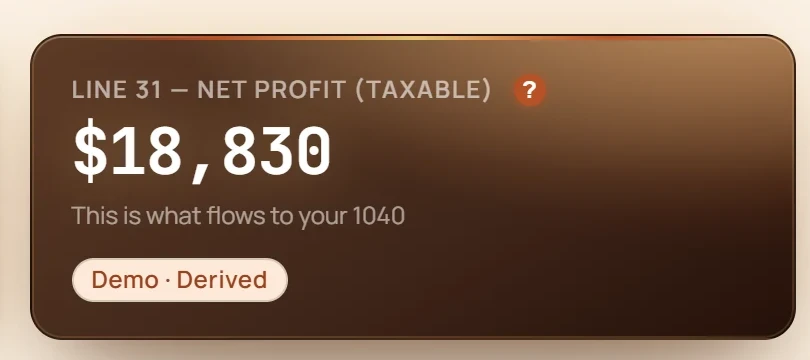
GlidePath Money Business screen showing a Schedule C preview with gross receipts, mapped expenses, home-office deduction, and net profit.

Business

Schedule C as the year unfolds.

The $199 Personal + Business tier adds invoices, mileage, 1099 prep, and Schedule C lines so December is a review, not a reconstruction.
  • Schedule C lines
  • Gross receipts
  • Net profit
Open this feature →
GlidePath Money invoice screen showing a business invoice with customer, line items, status, and payment details.

Invoices

Business paperwork stays beside the money.

Invoices, payments, and customer records live in the same local workspace as the income and expense review.

  • Invoice status
  • Line items
  • Payment context
Open this feature →
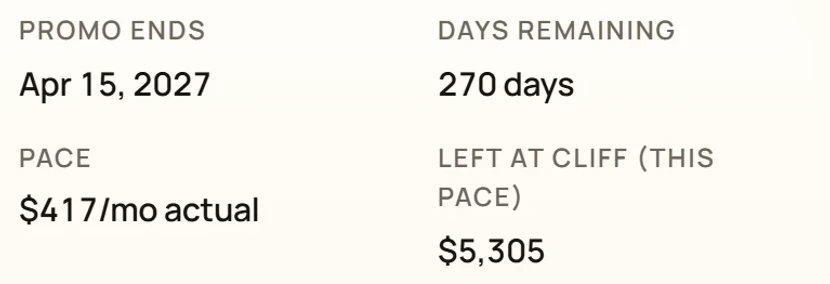
GlidePath Money Balance Transfers screen showing an active 0% APR promo card with days remaining, monthly payment to clear, post-promo APR, and paydown progress.

Balance transfers

The promo deadline is impossible to miss.

Every BT shows days remaining, monthly payment to clear, post-promo APR, paydown progress, and whether the schedule is behind.
  • Days left
  • Clear-by payment
  • Behind/ahead pace
Open this feature →
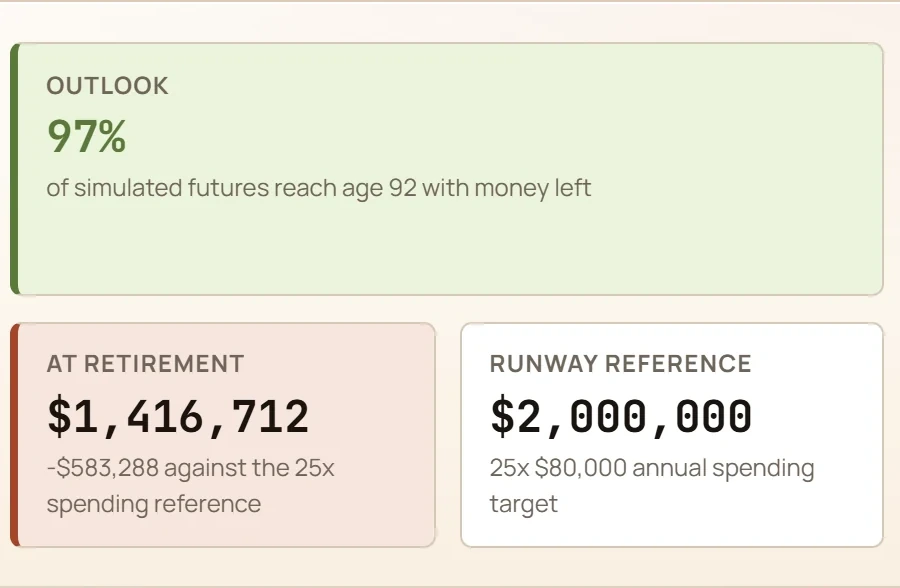
GlidePath Money retirement quick read showing the written verdict, a 97% Outlook across 1,000 simulated futures, the hardest-10% check, the at-retirement projection, and the 25x spending runway reference.

Retirement

A retirement answer with the math attached.

Monte Carlo probability, the hardest-10% stress check, the at-retirement number, and plain-English context sit together instead of hiding behind a black-box score.

  • Probability
  • Assumptions
  • Plain-English read
Open this feature →
GlidePath Money Equity screen showing an RSU grant with vesting schedule, shares vested, and tax withheld at vest.

RSUs & equity

Vests, taxes, concentration, and sales in one place.

Equity comp is not just a balance. GlidePath tracks upcoming vests, withholding estimates, realized gains, and employer-stock concentration.

  • Vest schedule
  • Withholding
  • Concentration
Open this feature →
GlidePath Money Spending screen showing a donut chart by category with dollar totals and percentage shares.

Reports

Spending graphs that explain the ledger.

Category and merchant views turn CSV transactions into readable reports without handing a third party your bank login.

  • Category split
  • Merchant review
  • CSV path
Open this feature →

Demo names, account numbers, and dollar amounts are fictionalized. Screenshots are product proof, not financial advice or forecast guarantees.

How it works

The loop produces a state, then lets you finish.

Know the state of your money. See what changed. Understand what it means. Make the next decision. Be done for now. Every beat keeps its receipt.

  1. 1 See the state

    Money State opens with a dated read of what your local files, close history, and assumptions support.

    Receipt: freshness line + local sources
  2. 2 See what changed

    Changed Since Last Close names the movement and keeps the source close enough to inspect.

    Receipt: close anchor + source link
  3. 3 Make one decision

    One Decision surfaces a choice worth considering, or records an honest dated skip when nothing needs a call.

    Receipt: decision line or dated skip
  4. 4 Close and be done

    The Close archives the official brief. Past closes keep the changed, quiet, decision, and close facts browsable.

    Receipt: archived official Money State
  5. 5 See the echo

    A modeled runway — how many months current cash could cover planned outflows — shows how the current path echoes forward, with the assumption sentence kept visible.

    Receipt: runway anchor + modeled assumption

Capture without drama

A bank export becomes a reviewed import.

This is the kind of automation that fits the product: you stay in control, the app removes the busywork, and nothing saves until you can review the result.

1 Export at your bank 2 Catch the file 3 Review locally

Trust receipt

The privacy model in one glance.

The short version should be easy to check before anyone has to read a policy. GlidePath is a local-first desktop app; online touchpoints are either required operating services or clearly labeled optional features.

Default

Core file stays local

Accounts, transactions, balances, planning inputs, and projections live on your computer by default.

Required

License and update checks

Activation and update services see license/device metadata, not your household financial file.

Opt-in

Only labeled extras leave

AI categorization, forwarded email parsing, and price lookups each explain what they touch.

Proof

Receipts beat promises

Privacy, security, refund, release notes, and claim checks stay linked so the public story can be verified.

If something goes wrong

Made a wrong move? You can step back out of it.

Local-first means the recovery story is yours too — so GlidePath builds the safety in. Nothing saves until you’ve seen it, the bigger changes get a restore point first, and your money stays in local files you control.

Nothing saves until you’ve seen it

Imports stage off to the side and show you exactly what would change — how many rows would be added, which look like duplicates, sample values — before a single one is written. You commit only when it looks right.

Restore points for the bigger changes

For larger imports and high-impact system changes — like a data-structure upgrade — GlidePath creates a restore point first, and tells you the backup’s name when it makes one. Restoring from a backup snapshots your current state too.

Undo an import in one click

Pulled in the wrong file? Undo removes exactly the rows that import added — nothing else — straight from the import receipt.

A crash won’t half-write your money file

Core money-file saves go to a temporary file that is swapped in only once it is complete. Lose power mid-write and the file is whole, not half-written.

A backup you actually hold

Zip your whole data folder and download it — to a USB stick, your own cloud drive, wherever you want it. It is a file you control: no black box, no lock-in. GlidePath keeps your recent backups on hand and clears out the old ones (up to 30).

Try anything without touching your real data

Explore mode runs on a fictional household. Click around, run the scenarios, even start over — your real files are never part of it.

None of this is a setting you have to find or a tier you have to buy — it is simply how GlidePath handles your money. See what stays on your computer →

How to think about the category

GlidePath is not trying to be another synced budgeting app.

If you want automatic daily transaction sync above everything else, Copilot, Monarch, YNAB, or Rocket Money may fit better. GlidePath is for the household that wants deeper planning math, visible assumptions, and a financial file that stays on the computer by default.

GlidePath Money

Best when you want retirement, debt, tax, cash-flow, and self-employed decisions in one local-first tool.

  • Private desktop license; optional yearly maintenance
  • No bank-login connection required
  • Visible formulas and assumptions
  • Balance-transfer cliffs and planning ripples

Copilot / Monarch

Best when you want polished automatic account sync, mobile/web convenience, and everyday budget tracking.

  • Beautiful daily tracking
  • Automatic categorization and sync
  • Subscription model
  • Cloud-first account connection

YNAB / Rocket Money

Best when your main goal is behavior-change budgeting or finding subscriptions and bills to reduce.

  • Strong behavior loops
  • Established brand trust
  • App-store and review proof
  • Less built around local-first planning depth

That tradeoff is deliberate: GlidePath gives up automatic bank-login sync so your core file can stay local, inspectable, and portable.

See the full comparison →

What you're buying

A desktop app you can keep using, with no locked pro tier.

Pricing should be clear before the fine print: buy a desktop license, get every feature in your tier, and keep your financial file on your machine.

Personal $129 desktop license
Personal + Business $199 desktop license
Updates after year one $39/yr optional maintenance, auto-renews and can be canceled
  • A private desktop app you can keep using if maintenance lapses.
  • Every feature in your tier included; no locked pro tier or paid capability upsells.
  • First year of maintenance included; maintenance keeps eligible tax rules, parsers, security fixes, support, and online extras current after that.
  • Your financial data does not become hostage to a cloud account.

Before you buy

Quick answers.

Do I have to connect my bank?

No. GlidePath runs on local files and manual or imported data — drag-and-drop CSV import, or the optional browser extension for one-click captures. No bank-login connection required.

Does my data leave my computer?

Your financial file stays local by default. Required touchpoints are license activation and update checks — a license key and device info, never financial data. Optional features send more only if you turn them on: AI categorization (payee, amount, date, account type, and category names for rows you choose). Each shows what it sends before you use it.

What happens if I stop maintenance?

The version you bought keeps working. Your first year of updates is included. After that, $39/year maintenance auto-renews to keep eligible tax rules, bank parsers, security patches, and new features current; we email before renewal, and you can cancel anytime in one click.

Is this financial advice?

No — it’s an educational planning tool. It shows you assumptions and tradeoffs in plain English, but it isn’t personalized tax, investment, or legal advice.

Where you’ve been matters less than where you’re going.

Retirement, tax windows, debt cliffs, subscriptions, and spending — with the math close enough to inspect, and none of the judgment.