Flagship feature
0% balance transfers, without the cliff at the end.
Move a balance to a card offering 0% APR and every dollar you pay goes to principal — done right, it saves you thousands. Miss the promo deadline and the rate snaps back to 20–29%. Most personal-finance apps track the balance; GlidePath tracks the one date that decides which way it goes.
Free, no email required: print the 0% Cliff Checklist →
How a 0% balance transfer actually works.
The opportunity, and the catch nobody points out — in plain English.
The opportunity
You move a balance from a high-interest credit card to a new card offering 0% APR for the next 12–21 months. While the promo runs, every dollar you pay goes to principal, not interest. Done right, it can save you thousands.
The catch — one hidden deadline
When the promo ends, the rate snaps back to 20–29% APR, and any balance still sitting there costs you fast. Some deferred-interest offers are harsher and can charge interest back to day one, so the statement terms matter. That deadline lives in the cardholder-agreement PDF you signed at the bank — which is why the automatic bank-sync feeds most budgeting apps rely on (the “aggregators”) usually don’t include it. We built GlidePath so you never miss it.
What every number on the card means.
This is what GlidePath shows you for every transfer you’re carrying — big, labeled, and in plain English.
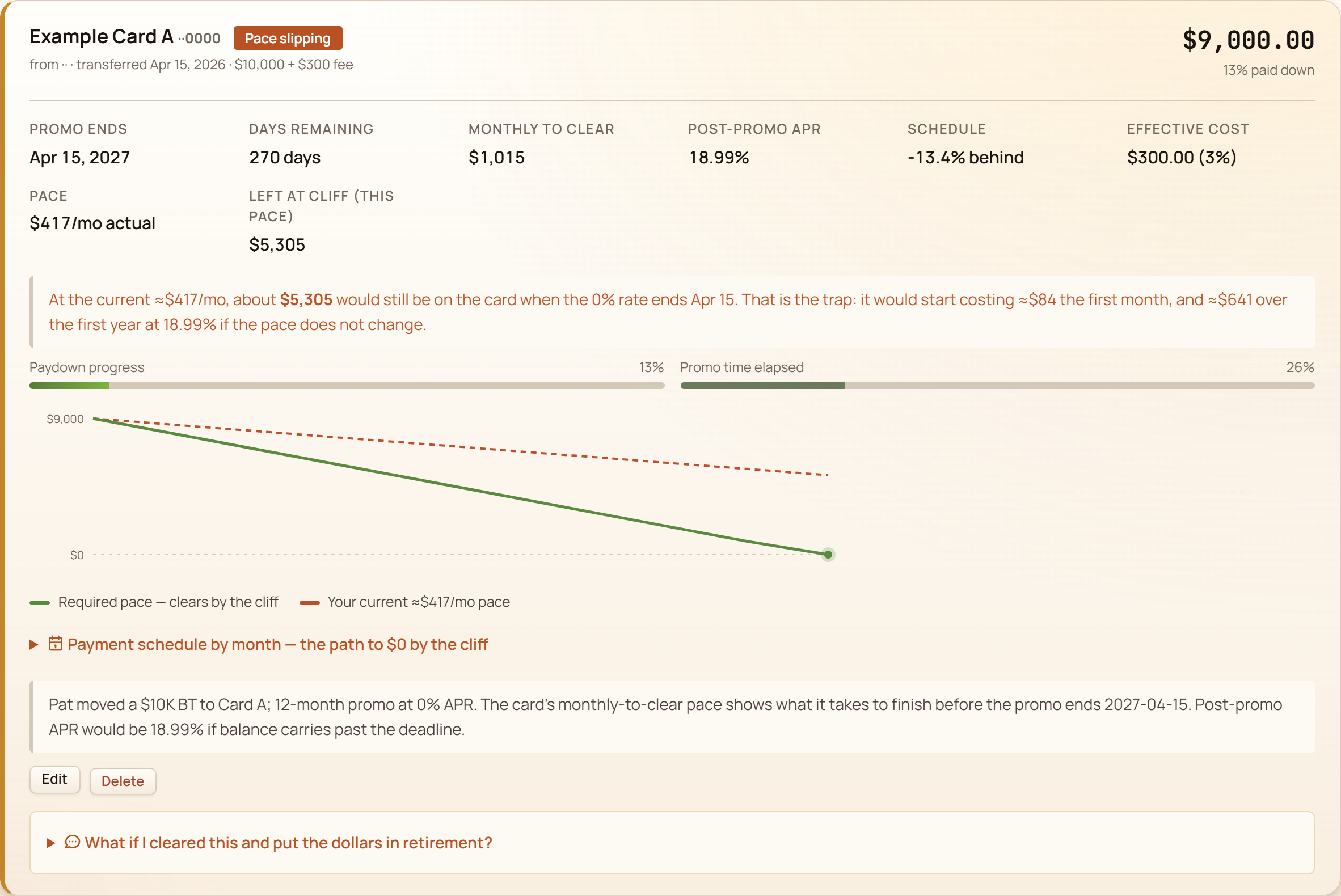
- Are you on track? One glance says whether you're paying it down fast enough to beat the deadline. Green means yes — and it flags the moment your pace drops below what clears it in time.
- The promo deadline The date your 0% ends — the one buried in your cardholder agreement, not your bank feed. Miss it and the rate snaps back.
- Monthly payment to clear it Pay this much each month and the balance is gone before the promo ends, so you never touch the high rate. Budget this one number.
- The post-promo APR What the rate becomes the day after the promo — the cliff you're racing. Shown up front so it's never a surprise.
- Paydown vs. time used Dollars paid (left bar) against promo time used (right). If the right bar pulls ahead of the left, you're falling behind — at a glance.
- The ripple into retirement Open this to see what clearing the debt does to your 30-year plan — the interest saved, invested and compounded over time.
For every active BT, you see
- Days remaining until your 0% expires — color-coded by urgency.
- Monthly payment needed to clear the balance before the promo ends.
- Post-promo APR displayed alongside, so you know exactly what you're racing.
- Action queue on the home page surfaces the ones running out of time first.
- Expired-promo warnings — if interest started accruing, you'll see it that day.
- Paydown progress auto-derived from your account-balance history. No double-entry required.
Catch one missed deadline and it can cover the app many times over — not because you did anything wrong, but because most tools surface the balance, not the date.
Strategy comparison, side by side.
Avalanche (kill the highest APR first), snowball (kill the smallest balance first), and promo-aware (kill cards whose 0% is about to expire) — the simulator runs all three month-by-month and shows the dollar difference between strategies. See the 0% APR payoff calculator →
The simulator marches month-by-month, applies the right APR (including 0% promos and post-promo cliffs), and shows you the dollar difference.
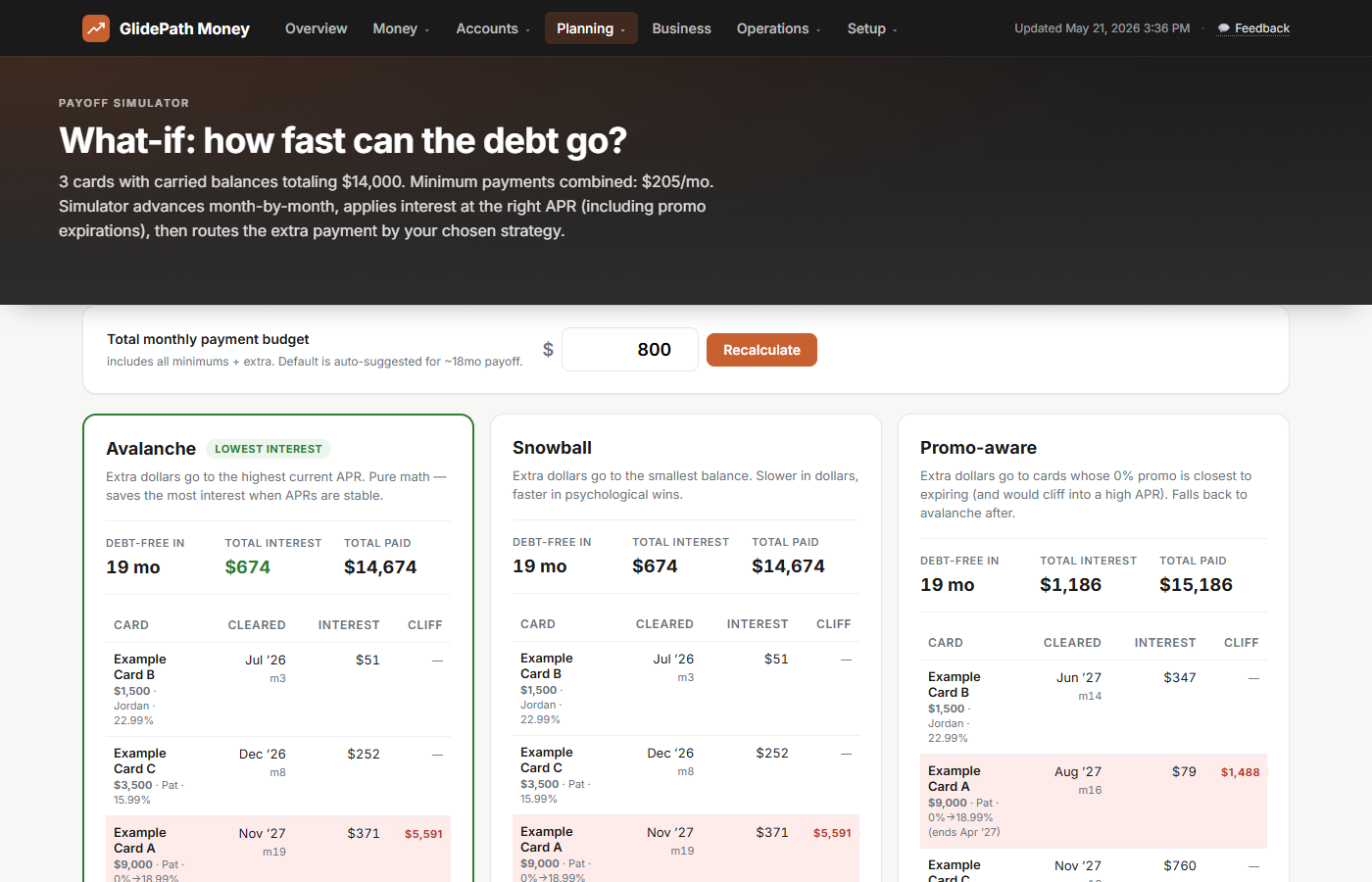
The right strategy depends on what cards you carry — and you only know when you see all three at once.
Why this is hard to find elsewhere.
Three reasons, none of them mysterious — they just add up to "the deadline you most need to know about is the hardest one to find."
The other apps can't see the date.
Most budgeting apps rely on bank or aggregator feeds for balances and transactions. Those feeds typically do not include the promo expiration date or the post-promo APR. Those numbers live in the credit card terms PDF you got at signup, which is exactly the detail GlidePath asks you to track.
Your bank knows, but doesn’t make it easy.
The bank knows exactly when your promo ends. They mention it once on a statement PDF and trust you to remember for the next 12-21 months. Most people have enough going on that reading every statement PDF every month isn’t realistic. GlidePath is the system that remembers for you.
The math is bigger than it looks.
A $9,000 balance carried past a promo at 22.99% means roughly $2,000 a year in interest you weren’t planning to pay. Over a few promos and a few years, that’s a noticeable chunk of your savings rate — easily worth one well-placed deadline reminder.
One card payment, three ripples.
Clearing a balance doesn’t just cut interest. Your utilization drops — the credit-score factor that moves fastest — and the dollars you free up keep compounding toward retirement. GlidePath connects all three from a single payment: the interest you save, the score factor that improves, and what those same dollars become in your 30-year plan. Most tools show one of the three.
That’s what the Credit Health page is for — it maps the five factors the scoring models (FICO, VantageScore) actually weigh onto the numbers you already keep:
- Utilization, the fastest lever. Per-card and overall, plus the exact dollars to get under the 30% (and 10%) thresholds scorers reward.
- Payment history, the biggest factor. Which cards aren’t on autopay yet, and every due date, so one slip never costs you.
- Length, new credit, and mix. What each factor means and where your own accounts stand on it.
And it’s computed from the balances and card details you enter or import — no credit-report pull, no soft inquiry, no third-party score service. GlidePath doesn’t pull your credit file or send your card details to a scoring service.
Catch the next expiration before it costs you.
$129 desktop license. Unlimited cards and BT promos. Stop maintenance any time and your installed version keeps working; your data stays yours on disk.
GlidePath shows you the math — for your specific situation, talk to a fiduciary advisor or CPA.