Planning, not tracking
Plan the next 30 years, not just last month.
Most finance apps show you where last month's money went. We answer the harder ones — can you retire at 62? Do a Roth conversion this year, or wait? With the math behind every answer.
Real talk
Nobody's finances feel "on track" all the time.
Whether you're staring at the bills wondering how to get out from behind the 8-ball, or you've saved diligently for thirty years and still don't know if it's enough — the feeling is the same. Most personal-finance tools either pile on the judgment ("look at all the things you didn't do") or hand you a single number you're told to trust.
GlidePath Money is built differently. The math doesn't care where you started — only where you can go from here. It shows you the leverage points, quantifies what one small change actually buys you, and puts the next decision in front of you instead of the last ten you wish you could undo.
No "you should have started earlier." Just an honest picture of what you have, what the money you DO have can do, and where to point your effort first.
Where you've been doesn't matter as much as where you're going — and we'll help you get there.
Works at any life stage.
The retirement-math language can sound like it's for people 10 years from retiring. It's not. GlidePath's planning depth scales down to "I just started saving" and up to "I'm reading my Medicare booklet." Three example users, all stages of saving:
Mid-career juggle (30s–50s)
Mike, 42. Married, two kids, mortgage, 0% APR card from the kitchen remodel, college 529s started. Already uses Simplifi for transactions. Wants to know which competing priority — pay off the card, fund the 529, max the 401(k) — actually moves the retirement date most. GlidePath quantifies it.
Just starting (20s–30s)
Sarah, 27. $30K saved across her 401(k) and a brand-new Roth IRA. Wonders if she's "doing it right." GlidePath shows what an extra $200/mo into her Roth becomes over 38 years (spoiler: ~$479K), so the small decisions feel as significant as the math says they are.
Pre-retirement decisions (50s–60s)
Linda, 61. Single, $850K in her 401(k), planning to retire at 63. Wants confidence in the math, not more apps to learn. GlidePath shows her the Social Security claim-age trade-off, the Tax Valley window for Roth conversions, and the ACA bridge cost between retirement and Medicare — all in one view, all explained.
Single-person households are first-class. Toggle Household Type to Single on /Retirement and every assumption (tax brackets, SS provisional thresholds, spousal math) adjusts. Linda above is single.
Three things nobody else does together.
Each card below names a real problem, then says how we handle it. Click through for the deeper read on any one.
Answers the questions you'd hire a planner for.
Can I retire at 62? Should I do a Roth conversion this year? Will Social Security cover what I need? If I retire before 65, how do I afford health insurance until Medicare? These are the questions retirement planning is actually for, and most apps don’t try to answer them. We do — and each projection comes with the formula and the assumptions, in plain English. The depth Boldin charges $120/yr for, included.
Catches the credit-card deadline that costs you thousands.
When you move debt to a 0% intro-rate credit card, the deadline you didn’t write down is the one that can snap your rate back to 25%. We surface the countdown, tell you the monthly payment needed to clear it before the cliff, and warn you on every expiration. Mint, Simplifi, and Monarch don’t — their Plaid feed doesn’t carry promo dates. We built this so you never miss one.
Shows our work on every number.
Every meaningful figure opens up to show where it came from — the formula, the assumptions, the caveats — in plain English you can actually read. Click any (?) for one explanation, or toggle "Explain Mode" in the top bar to keep them all open while you browse. Finance decisions deserve more than a number you’re told to trust.
"Explain Mode" — show, don't tell.
Every meaningful number in GlidePath can be expanded inline to reveal where it came from. Here's what that looks like — same number, two ways. Toggle Explain Mode and every projection on your screen behaves like the right side.
Explain Mode: OFF
Median nest egg at age 65
$1.46M (?)
Just a number. Trust us.
Explain Mode: ON
Median nest egg at age 65
$1.46M
- Starting balance: $467K (your current net worth)
- Annual contributions: $24K (401(k) + Roth + match)
- Expected return: 7%/yr (60/40 long-run historical)
- Volatility: 12% σ (sequence-of-returns risk in)
- Horizon: 23 years (you're 42, retiring at 65)
- Method: 1,000 Monte Carlo runs; "median" = the 500th outcome
Worst decile: $890K · Best decile: $2.4M · Success probability: 84%
Every chart, stat card, and projection has this. No more "the app says I'm fine" — you see why, and what would change the answer.
See it for yourself.
Three views from the live app, rendering a fictional 42-year-old household — Pat and Jordan Acme.
Liquid + retirement + real estate, less loans & cards. Updates as you snapshot balances.
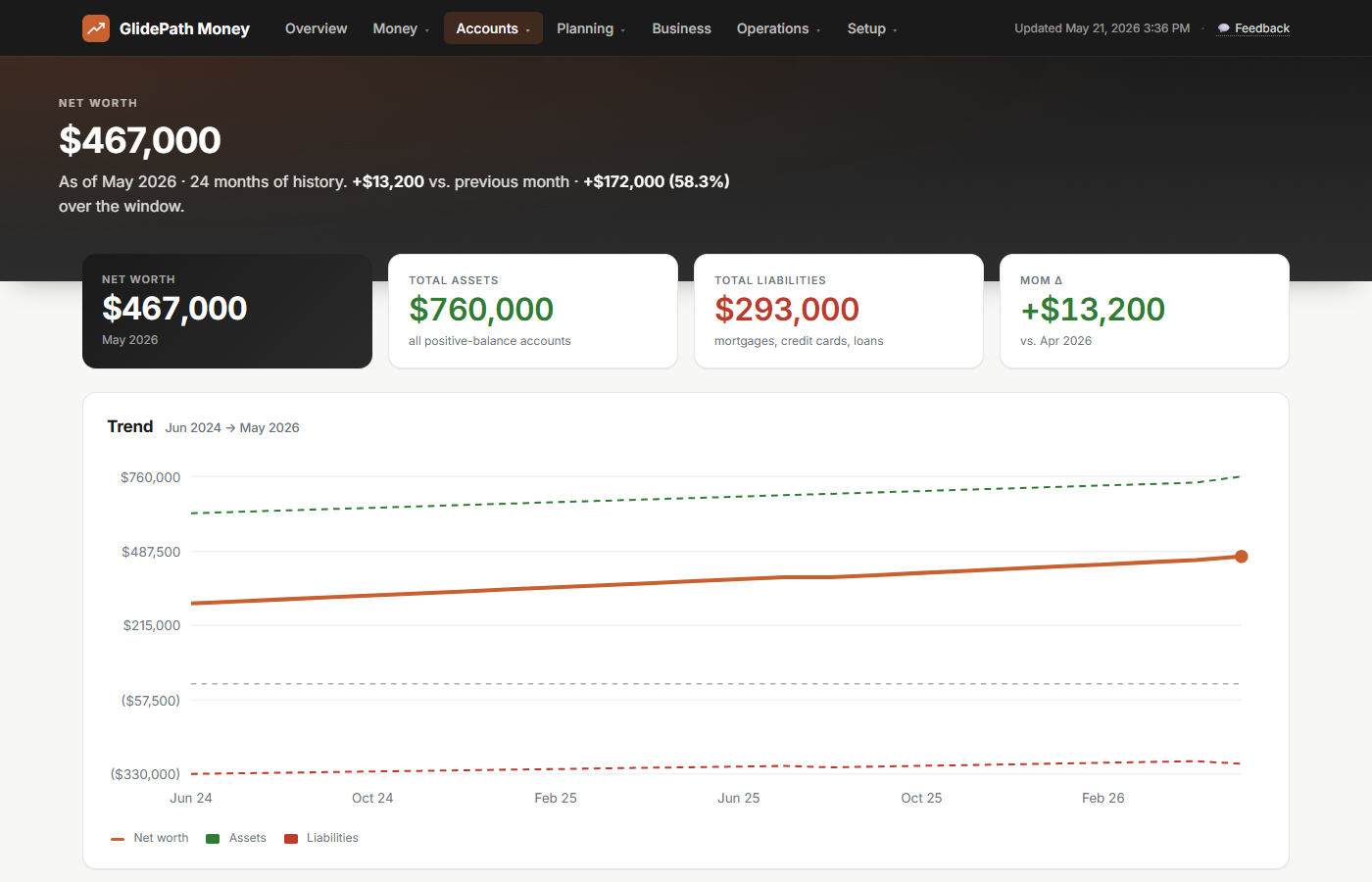
Watch the trajectory tilt up as retirement compounds and the mortgage balance falls.
1,000 simulations of market returns — median trajectory plus the 10–90% range around it.
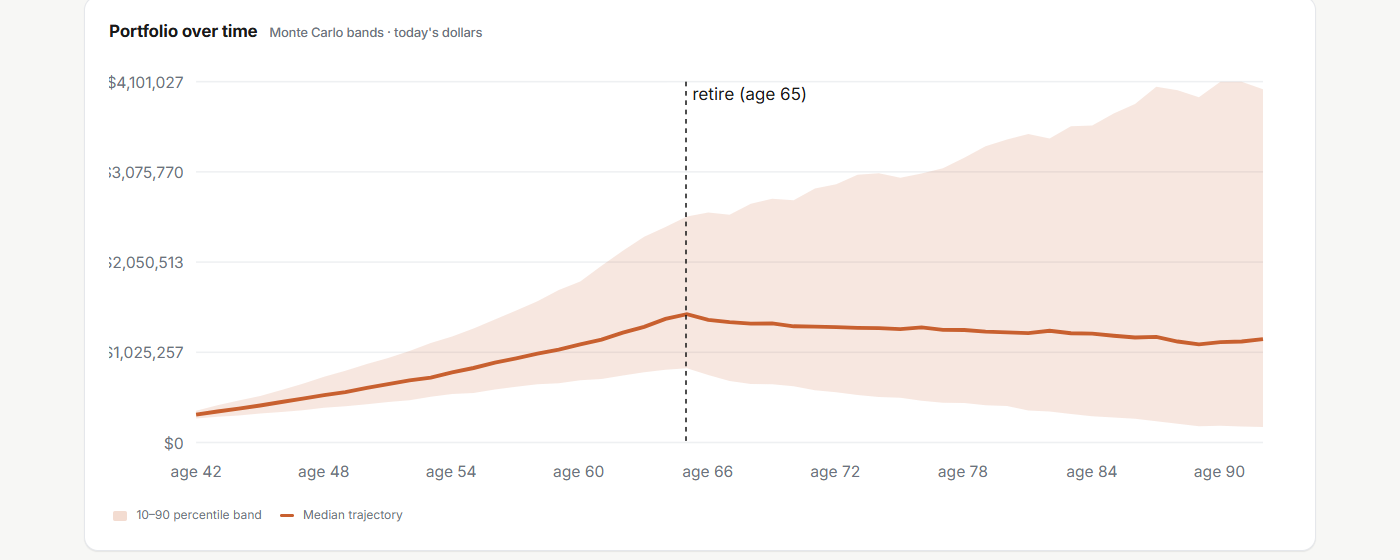
Most outcomes cluster around the median, but you'll see the worst-case tail too.
Avalanche vs Snowball vs Promo-aware — month-by-month with the right APR per card.
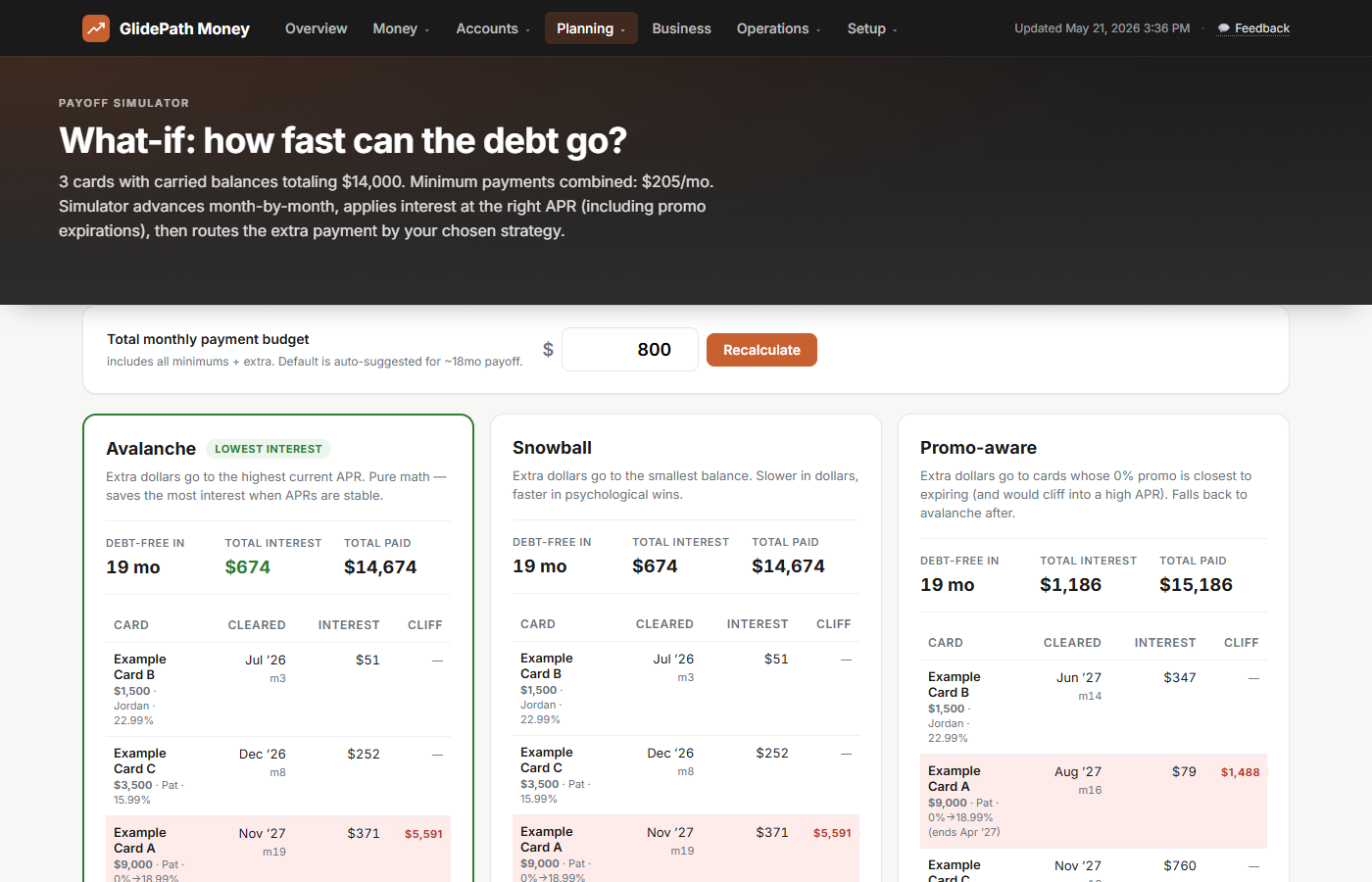
The right strategy depends on your cards — and you only know with all three on screen.
Already using Simplifi or Monarch? Keep using them.
The most common question we get: "Do I have to drop my current tool to use GlidePath?" No. If you already pay for an aggregator that auto-links your bank accounts and tracks daily transactions, keep it. GlidePath sits on top.
Every major aggregator exports CSV. Once a month, drop the file in your GlidePath DataFolder and the Net Worth, Spending, and Cash-Flow pages fill in automatically. You get planning-grade math (Monte Carlo, Tax Valley, BT tracking, SS scenarios) on the same numbers your aggregator already knows about — no double bookkeeping, no extra friction, no abandoning a workflow that works for you.
Supported out of the box: Simplifi · Monarch · Mint exports · Quicken Classic · YNAB · Empower · Personal Capital, plus direct CSV downloads from Chase · BoA · Discover · Amex · Schwab · Fidelity · Vanguard. And every other bank that exports CSV — which is basically all of them.
Hardcore privacy-first customers can skip aggregators entirely and download CSVs directly from each bank's website. Either path works; you pick the trade-off.
And everything else you'd expect.
The planning math is the differentiator. The day-to-day tracking, household setup, and self-employed tax tooling all work too — so the planning is fed by real numbers.
Cash flow & spending
Monthly cash flow, transaction ledger with rich search, spending categorization, gap analysis that flags months projected expenses outrun income. Import CSVs from Mint, Simplifi, Monarch, YNAB, Quicken, or any bank.
Households + self-employed
Multi-partner support, quarterly tax estimate for contractors, IRS mileage log, 1099-NEC prep dashboard, business P&L, cash runway. Built for real life — couples, families, side projects, full-time self-employed.
Your data, your machine
All accounts, transactions, and projections live in plain files on your PC. We never see them. No "anonymized data sharing," no AI training, no Plaid integration one breach away from your savings. Cancel any time; your data stays.
Ready to see your own numbers?
$129 one-time for Personal, $199 for Personal+Business. Optional $39/yr keeps you current on bank parsers, tax rules, and new features. Stop paying whenever — the app you bought keeps working. Your data is yours forever.